


The KNX integration connects Home Assistant to your KNX installation, allowing you to control KNX devices, act on telegrams and forward state changes from other integrations entities to your KNX bus.
This integration requires a local KNX/IP interface or router to establish the connection between Home Assistant and your KNX bus.
There is currently support for the following device types within Home Assistant:
Configuration
To add the KNX hub to your Home Assistant instance, use this My button:

Manual configuration steps
If the above My button doesn’t work, you can also perform the following steps manually:
Browse to your Home Assistant instance.
In the bottom right corner, select the Add Integration button.
From the list, select KNX.
Follow the instructions on screen to complete the setup.
KNX Connection
Select the connection type to your KNX bus. The integration supports the following connection methods:
- ‘Automatic’ performs a gateway scan on start, to find a KNX IP interface. It will connect via a tunnel. This option is not available when a gateway scan at setup initiation was not successful.
- ‘Tunneling’ will connect to a specific KNX IP interface over a tunnel.
- ‘Routing’ will use Multicast to communicate with KNX IP routers.
For more information about KNX connection types see Connection.
Tunneling specific settings
You can select a specific tunnel device if multiple were found during the setup. In case no device was discovered, you can configure connection information manually.
Enable if your KNXnet/IP tunneling server is behind NAT. Only applies for UDP connections.
Tunnel endpoint
Select the tunnel endpoint used for the connection. This step is only available for TCP or Secure Tunneling connection types.
Routing specific settings
KNX individual address to be used by Home Assistant to send telegrams. This shall not be used by any other device in your installation.
Select if your installation uses encrypted communication according to the KNX IP Secure standard. This setting requires compatible devices and configuration. You’ll be prompted for credentials in the next step.
KNX IP Secure specific settings
See Connection on how to get the files or keys needed for this configuration step.
Reconfiguration
You can change your KNX connection configuration at any time through the integration settings. This is useful when you need to update the Keyring file or switch to a different connection type.
- Go to Settings > Devices & services.
- Select KNX.
- Click the three-dot menu and then select Reconfigure.
Configure KNX interface
Reconfigure your connection settings. See above for more information.
Import KNX Keyring
Provide a new keyring file to be used by the integration. See KNX Secure on how to get this file.
Options
Options for KNX can be set via the user interface, by taking the following steps:
- Browse to your Home Assistant instance.
- Go to Settings > Devices & Services.
- If multiple instances of KNX are configured, choose the instance you want to configure.
- Select the integration, then select Configure.
Basic configuration
In order to make use of the various platforms offered by the KNX integration, you will need to set them up via the KNX panel or add the corresponding configuration yaml to your configuration.yaml. See Splitting up the configuration if you like to arrange YAML parts in dedicated files. After changing the configuration.yaml file, restart Home Assistant to apply the changes. The integration is now shown on the integrations page under Settings > Devices & services. Its entities are listed on the integration card itself and on the Entities tab.
Please see the dedicated platform sections below about how to configure them correctly.
Group addresses
Group addresses are configured as strings or integers in the format “1/2/3” for 3-level GA-structure, “1/2” for 2-level GA-structure or “1” for free GA-structure.
The HA KNX integration uses configured state_address or *_state_address to update the state of a function. These addresses are read by GroupValueRead requests on startup and when there was no incoming telegram for one hour (default sync_state).
It is possible to configure passive/listening group addresses for all functions of every KNX platform (except expose and notify). This allows having multiple group addresses to update the state of its function (e.g., the brightness of a light). When group addresses are configured as a list of strings, the first item is the active sending or state-reading address and the rest is registered as passive addresses. This schema behaves like in ETS configuration where the first is the “sending” address and others are just for updating the group object.
If your KNX device provides active state group objects it is advised to use *_state_address instead of passive addresses as it reduces configuration complexity and avoids wrong states (e.g., when channels are logically locked).
Connection
Connection parameters are configured during integration setup and can be modified later in the integrations settings.
KNX Secure
The KNX integration supports both IP Secure and Data Secure.
IP Secure
IP Secure credentials can be provided in two ways:
- Using a
.knxkeysfile: This file can be exported from ETS and imported into the integration settings. - Manual configuration: If you are not using Data Secure, you can manually input the required IP Secure credentials in the integration settings.
Data Secure
Data Secure credentials are always sourced from a .knxkeys file. You can import or update the Keyring file from the integrations settings.
Important
Assign all secured group addresses that Home Assistant will use to either the interface’s tunnel endpoint or a dummy device in ETS before exporting the Keyring file.
When updating secure groups, ensure all participating devices, routers, and couplers applications are updated as well. After making changes, load the updated Keyring file into Home Assistant.
Tunneling
Tunneling uses a KNX IP Interface to connect to the KNX bus. Most KNX IP Routers also support tunneling connections. This is the recommended connection type and is also used when selecting an “Automatic” connection in the integration setup.
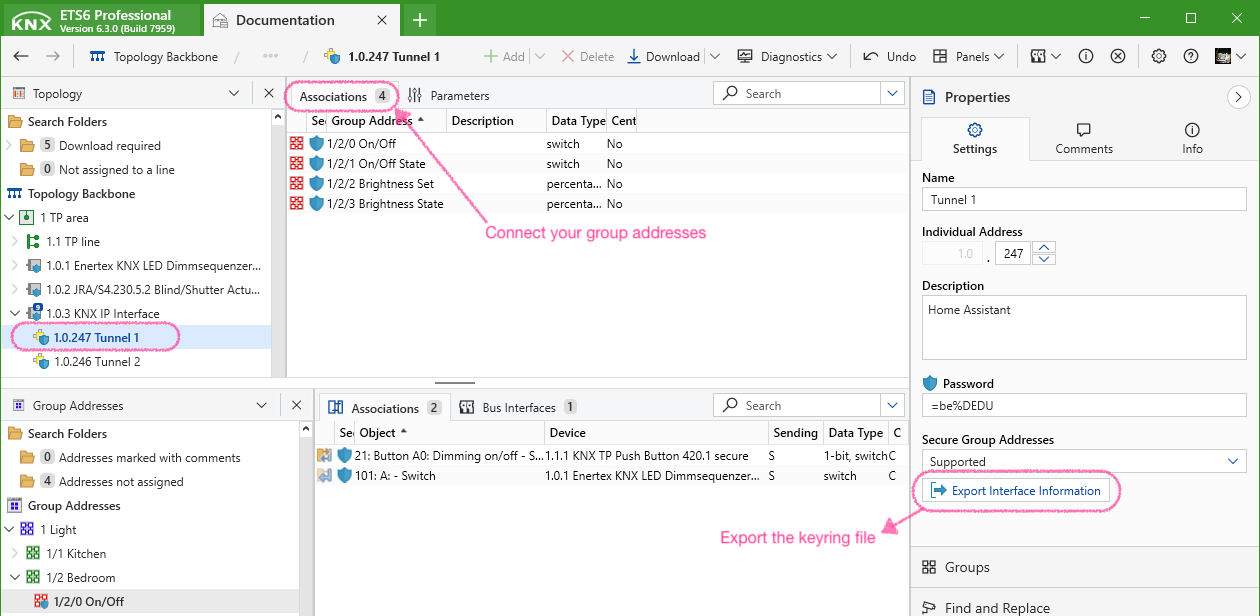
For modern interfaces (supporting TCP or IP Secure) you can select a specific tunnel endpoint to be used. Make sure that Home Assistant is the only client connecting to this tunnel endpoint. In ETS it is recommended to connect the group addresses you want to use to the tunnel endpoint that Home Assistant uses. For secure group addresses, this is mandatory.
If you use KNX IP Secure tunneling or Data Secure, export the Keyring file from ETS and import it in the KNX integration settings.
Note
If you want Home Assistant to use a specific individual address, you can change the address of the used tunnel endpoint in ETS.
Manual IP Secure tunneling credentials
If you opt for manual configuration of IP Secure tunneling, you will need the following:
- User-ID: Use a User-ID of 2 or higher. (IDs 0 and 1 are reserved). The first tunnel endpoint in ETS will typically use User-ID
2, the second3, and so on. - User password.
- Device authentication code (optional).
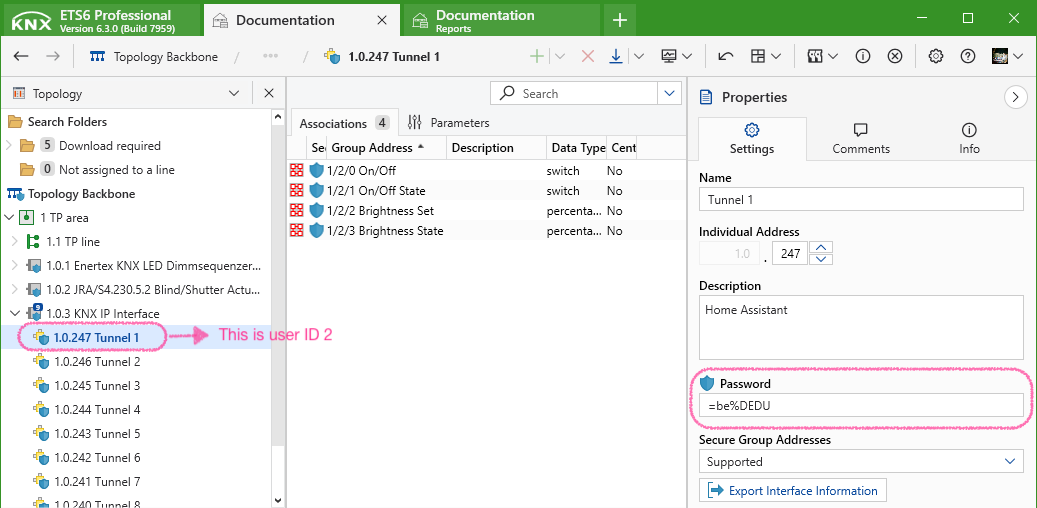
The following screenshot will show how you can find the device authentication code in ETS.

Routing
Routing communicates with KNXnet/IP routers via IP Multicast.
When using routing:
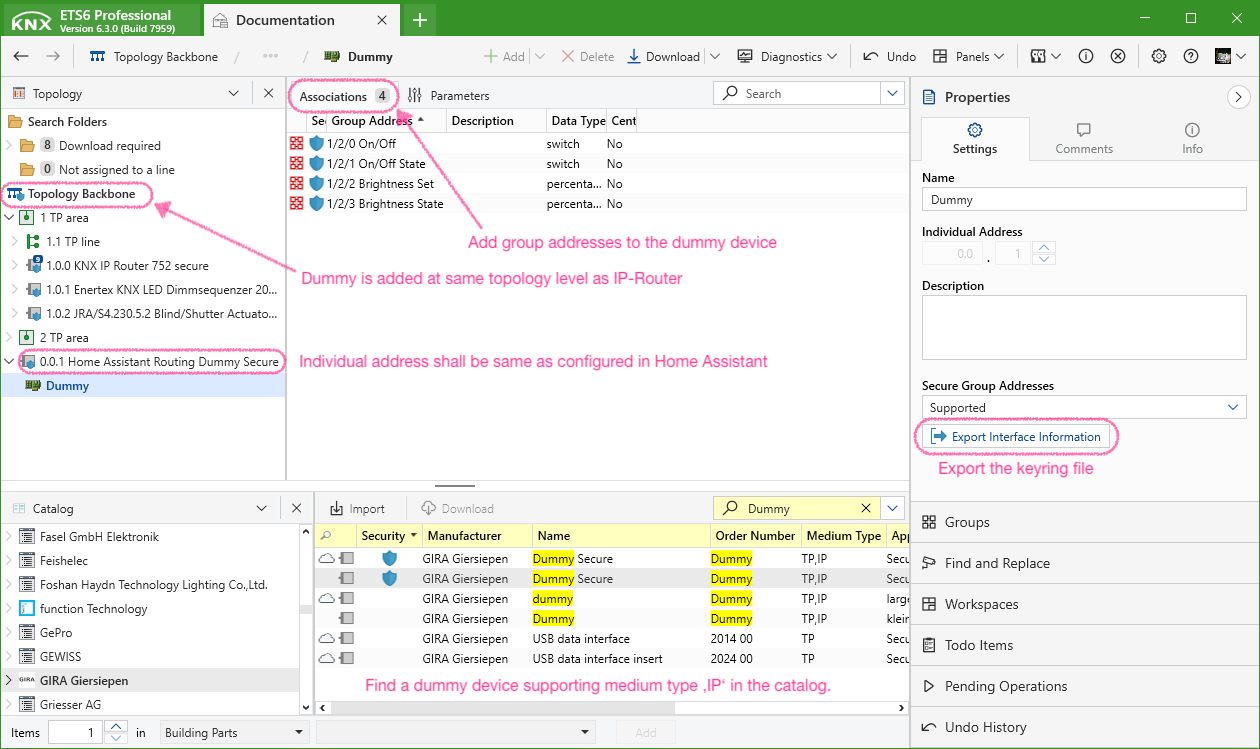
- Add a dummy device in ETS at the same topology level as your routers.
- Assign this dummy device the same individual address configured in the KNX integration setup.
- Connect all group addresses that Home Assistant will use to the dummy device. This ensures routers and couplers maintain updated filter tables and enables the use of secure group addresses in Home Assistant.
- If you use KNX IP Secure routing or Data Secure groups, export the Keyring file from ETS and import it in the KNX integration settings.
Manual IP Secure routing credentials
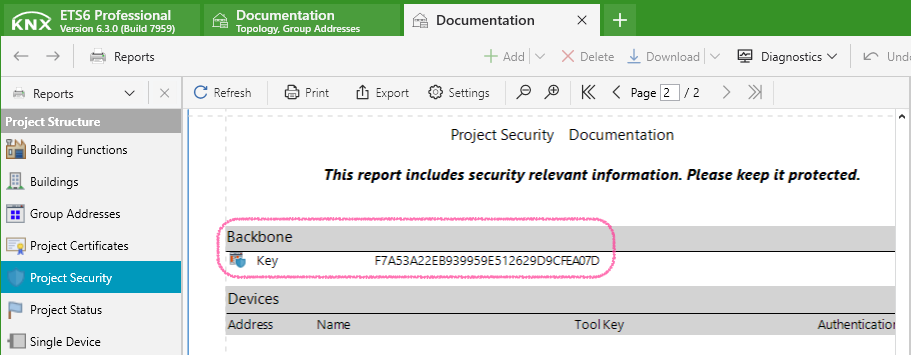
If you opt for manual configuration of IP Secure routing, you will need the backbone key. This can be found in the ETS “Project Security” report.
Data updates
This integration uses the KNX/IP protocol to receive telegrams live as they appear on the bus. When the integration is loaded, it actively requests data needed to initialize the configured entities. See Group Addresses for more details.
States of diagnostic entities of the “KNX Interface” device are polled every 10 seconds.
Triggers
The KNX integration provides its own trigger platform which can be used in automations.
Telegram trigger
The knx.telegram trigger can be used to trigger automations on incoming or outgoing KNX telegrams.
Note
This trigger is also provided as a device trigger by the KNX Interface device. It supports setting the options in the automation builder UI, but doesn’t support setting a specific DPT (type) to decode the payload as it always relies on project data.
Configuration Variables
A group address or a list of group addresses the trigger should listen on. If not set, or an empty list, the trigger will listen on all group addresses.
If set, the payload will be decoded as given DPT in the trigger data. When not set, the DPT is sourced from project data. KNX sensor types are valid values KNX Sensor (e.g., “2byte_float” or “percent”).
If set to false, the trigger will not fire on GroupValueWrite telegrams.
If set to false, the trigger will not fire on GroupValueResponse telegrams.
If set to false, the trigger will not fire on GroupValueRead telegrams.
If set to false, the trigger will not fire on incoming telegrams.
Available trigger data
In addition to the standard automation trigger data, the knx.telegram trigger platform has additional trigger data available for use.
trigger.destinationDestination group addresstrigger.destination_nameDestination group address nametrigger.directionTelegram directiontrigger.dpt_mainDestination group address main datapoint type numbertrigger.dpt_subDestination group address sub datapoint type numbertrigger.dpt_nameDPT value type name – see Sensor value typestrigger.payloadRaw telegram payload. DPT 1, 2, and 3 yield integers 0..255; other DPT yield lists of integers 0..255trigger.sourceSource individual addresstrigger.source_nameSource nametrigger.telegramtypeAPCI type of telegramtrigger.timestampTimestamptrigger.unitUnit according to group address DPTtrigger.valueDecoded telegram payload according to DPT
| Template variable | Type | Project data required |
|---|---|---|
trigger.destination | string | no |
trigger.destination_name | string | yes |
trigger.direction | string | no |
trigger.dpt_main | integer | yes |
trigger.dpt_sub | integer | yes |
trigger.dpt_name | string | yes |
trigger.payload | integer or list of integers | no |
trigger.source | string | no |
trigger.source_name | string | yes |
trigger.telegramtype | string | no |
trigger.timestamp | timestamp | no |
trigger.unit | string | yes |
trigger.value | any | yes |
For values that require project data: if the information was not found, or if no project file was provided, data will be set to null.
Examples
Example automation configuration
Example trigger data
Events
Tip
For automation triggers, it is recommended to use the knx.telegram trigger instead of knx_event.
Configuration Variables
Defines a list of patterns for matching KNX group addresses. Telegrams with destination addresses matching one of the patterns are sent to the Home Assistant event bus as knx_event.
Telegram payloads in knx_event events will be decoded using the configured type (DPT) for the addresses in the same block. The decoded value will be written to the event data value key. If not configured the value key will be None – the data key will still hold the raw payload (use this for DPT 1, 2, 3). All sensor types are valid types – see KNX Sensor (e.g., “2byte_float” or “1byte_signed”).
Every telegram that matches an address pattern with its destination field will be announced on the event bus as a knx_event event containing data attributes
datacontains the raw payload data (e.g., 1 or “[12, 55]”).destinationthe KNX group address the telegram is sent to as string (e.g., “1/2/3”).directionthe direction of the telegram as string (“Incoming” / “Outgoing”).sourcethe KNX individual address of the sender as string (e.g., “1.2.3”).telegramtypethe APCI service of the telegram. “GroupValueWrite”, “GroupValueRead” or “GroupValueResponse” generate a knx_event.valuecontains the decoded payload value iftypeis configured for the address. Will beNonefor “GroupValueRead” telegrams.
Actions
In order to directly interact with the KNX bus, you can use the following actions:
Send
Configuration Variables
Payload to send to the bus. When type is not set, raw bytes are sent. Integers are then treated as DPT 1/2/3 payloads. For DPTs > 6 bits send a list. Each value represents 1 octet (0-255). Pad with 0 to DPT byte length.
If set, the payload will not be sent as raw bytes, but encoded as given DPT. KNX sensor types are valid values – see table in KNX Sensor.
Read
You can use the homeassistant.update_entity action call to issue GroupValueRead requests for all *state_address of an entity. To manually send GroupValueRead requests, use the knx.read action. The response can be used in automations by the knx.telegram trigger and it will be processed in KNX entities.
Register event
The knx.event_register action can be used to register (or unregister) group addresses to fire knx_event Events. Events for group addresses configured in the event key in configuration.yaml cannot be unregistered. See knx_event
Configuration Variables
If set, the payload will be decoded as given DPT in the event data value key. KNX sensor types are valid values KNX Sensor (e.g., “2byte_float” or “1byte_signed”).
Register exposure
The knx.exposure_register action can be used to register (or unregister) exposures to the KNX bus. Exposures defined in configuration.yaml can not be unregistered. Per address only one exposure can be registered. See expose
Configuration Variables
In addition to the configuration variables of expose remove set to true can be used to remove exposures. Only address is required for removal.
Exposing entity states, entity attributes or time to KNX bus
KNX integration is able to expose entity states or attributes to KNX bus. The integration will broadcast any change of the exposed value to the KNX bus and answer read requests to the specified group address. It is also possible to expose the current time and date. These are sent to the bus every hour.
Tip
Expose is only triggered on state changes. If you need periodical telegrams, use an automation with the knx.send action to send the value to the bus.
Configuration Variables
Group address state or attribute updates will be sent to. GroupValueRead requests will be answered. For types time, date, and datetime, address is the only valid configuration variable..
Type of the exposed value. Either binary, time DPT 10.001, date DPT 11.001, datetime DPT 19.001 or any supported type of KNX Sensor (e.g., “temperature” or “humidity”).
Entity ID to be exposed. Shall not be used for types time, date, and datetime.
Attribute of the entity that shall be sent to the KNX bus. If not set (or None) the state will be sent. For example for a light the state is either “on” or “off”. With attribute you can expose its “brightness”. Shall not be used for types time, date, and datetime.
Default value to send to the bus if the state or attribute value is None. For example a light with state “off” has no brightness attribute so a default value of 0 could be used. If not set (or None) no value would be sent to the bus and a GroupReadRequest to the address would return the last known value. Shall not be used for types time, date, and datetime.
A template to process the value before sending it to the KNX bus. The template has access to the entity state or attribute value as value. Shall not be used for types time, date, and datetime.
Minimum time in seconds between two sent telegrams. This can be used to avoid flooding the KNX bus when exposing frequently changing states. If the state changes multiple times within the cooldown period the most recent value will be sent. Shall not be used for types time, date, and datetime.
Binary sensor
The KNX binary sensor platform allows you to monitor KNX binary sensors like window/door contacts, motion detectors, alarms, etc.
Note
Binary sensors are read-only entities. To write to the KNX bus, configure a KNX Switch entity or use the knx.send action.
Binary sensor entities can be created from the frontend in the KNX panel or via YAML.
Configuration of KNX binary sensor entities via YAML
Configuration Variables
Actively read the value from the bus. The maximum time interval (<minutes>) is 1440. The following values are valid
trueequivalent to “expire 60” (default)falseno GroupValueRead telegrams will be sent to the busevery <minutes>to update it regularly every <minutes>expire <minutes>to read the state from the KNX bus when no telegram was received for <minutes><minutes>equivalent to “expire <minutes>”initto just initialize the state on startup
Sets the class of the device, changing the device state and icon that is displayed on the frontend.
Invert the telegrams payload before processing. This is applied before context_timeout or reset_after is evaluated.
Specifies if telegrams should ignore the internal state and always trigger a Home Assistant state update.
The time in seconds between multiple identical telegram payloads would count towards an internal counter that can be used for automations. This setting defines the time window that a second telegram would count toward a single state change. So if you set this 3.0 you can take up to 3 seconds in order to trigger the second button press, and a single press would take 3 seconds to trigger a Home Assistant state update. If this is set, ignore_internal_state will be set to true internally. Maximum value is 10.0.
The category of the entity.
Automation example
Let’s pretend you have configured a binary sensor with the name Livingroom Switch and you want to toggle a light when the button was pressed once and another light when the button was pressed twice. context_timeout has to be configured in order for this to work and the switch would have to send the same payloads on each press (on – on within the time window).
Button
The KNX button platform allows to send concurrent predefined values via the frontend or an action. When a user presses the button, the assigned generic raw payload is sent to the KNX bus.
Tip
Telegrams received on the KNX bus for the group address of a button are not reflected in a new button state. Use the knx.telegram trigger if you want to automate on a specific payload received on a group address.
Important
When type is used value is required, payload is invalid. When payload_length is used value is invalid.
Configuration Variables
The length of the payload data in the telegram. Use 0 for DPT 1, 2 or 3.
A type from the value types table to encode the configured value.
The category of the entity.
Climate
The KNX climate platform is used as an interface to KNX thermostats and room controllers.
To use your KNX thermostats in your installation, add the following lines to your top level KNX Integration configuration key in configuration.yaml:
Alternatively, if your device has dedicated binary group addresses for frost/night/comfort mode:
If your device doesn’t support setpoint_shift calculations (i.e., if you don’t provide a setpoint_shift_address value) please set the min_temp and max_temp attributes of the climate device to avoid issues with exceeding valid temperature values in the frontend. Please do also make sure to add the target_temperature_address to the configuration in this case.:
setpoint_shift_mode allows the two following DPTs to be used:
- DPT6010 (for 1 byte signed integer with scale factor)
- DPT9002 (for 2 byte float)
Example:
operation_mode_frost_protection_address / operation_mode_night_address / operation_mode_comfort_address / operation_mode_standby_address are not necessary if operation_mode_address is specified.
The following values are valid for the heat_cool_address and the heat_cool_state_address:
0(cooling)1(heating)
Supported HVAC modes for your KNX thermostats are found automatically. This can be overridden by using the controller_modes configuration variable. The following values are valid controller modes:
offautoheatcoolfan_onlydehumidification
Supported preset modes for your KNX thermostats are found automatically. This can be overridden by using the operation_modes configuration variable. The following values are valid operation modes:
autocomfortstandbyeconomybuilding_protection
Configuration Variables
KNX group address for reading current room temperature from KNX bus. DPT 9.001
Defines the step size in Kelvin for each step of setpoint_shift (scale factor). For non setpoint-shift configurations this is used to set the step of temperature sliders in UI.
KNX group address for setting target temperature. DPT 9.001
KNX group address for reading current target temperature from KNX bus. DPT 9.001
KNX address for setpoint_shift. DPT 6.010 or DPT 9.002 based on setpoint_shift_mode
KNX address for reading setpoint_shift. DPT 6.010 or DPT 9.002 based on setpoint_shift_mode
Defines the internal device DPT used. Either ‘DPT6010’, ‘DPT9002’ or None. When None or omitted the DPT is auto-assigned from the first incoming telegram.
KNX address for reading current activity. 0 is idle, 1 is active. DPT 1
KNX address for reading current command value in percent. 0 sets the climate entity to idle if active_state_address is not set. DPT 5.001
KNX address for setting operation mode (auto / building protection / economy / standby / comfort). DPT 20.102
KNX address for reading operation mode. DPT 20.102
KNX address for HVAC controller status (in accordance with KNX AN 097/07 rev 3).
KNX address for reading HVAC controller status.
KNX address for setting HVAC controller modes. DPT 20.105
KNX address for reading HVAC control mode. DPT 20.105
KNX address for switching between heat/cool mode. DPT 1.100
KNX address for switching on/off frost/heat protection mode. DPT 1
KNX address for switching on/off economy mode. DPT 1
KNX address for switching on/off comfort mode. DPT 1
KNX address for switching on/off standby mode. DPT 1
Overrides the supported operation modes. Provide the supported preset_modes value for your device.
Overrides the supported controller modes. Provide the supported hvac_modes value for your device.
Overrides the default controller mode. Any Home Assistant hvac_mode can be configured. This can, for example, be set to “cool” for cooling-only devices.
Value for switching the climate device on/off is inverted.
KNX address for gathering the current state (on/off) of the climate device. DPT 1
KNX group address for setting the percentage or step of the fan. DPT 5.001 or DPT 5.010
KNX group address for retrieving the percentage or step of the fan. DPT 5.001 or DPT 5.010
Fan speed group address data type. percent for DPT 5.001 and step for DPT 5.010.
The fan mode for the zero speed, either off or auto. This affects the fan modes displayed in the UI.
KNX address for gathering the current state (on/off) of the (vertical) swing. DPT 1
KNX address for turning the horizontal swing on/off. DPT 1
KNX address for gathering the current state (on/off) of the horizontal swing. DPT 1
The category of the entity.
Cover
The KNX cover platform is used as an interface to KNX covers.
Note
Unlike most KNX devices, Home Assistant defines 0% as closed and 100% as fully open in regards to covers. The corresponding value inversion is done internally by the KNX integration.
Home Assistant will, by default, close a cover by moving it in the DOWN direction in the KNX nomenclature, and open a cover by moving it in the UP direction.
Cover entities can be created from the frontend in the KNX panel or via YAML.
Configuration of KNX cover entities via YAML
To use your KNX covers in your installation, add the following lines to your top level KNX Integration configuration key in your configuration.yaml:
Configuration Variables
KNX group address for moving the cover full up or down. DPT 1
KNX group address for moving the cover stepwise up or down. Used by some covers also as the means to stop the cover. Stepwise moves are only mapped to tilt angle functions in Home Assistant, as no stepwise move of cover position is generally supported by the architecture. If tilt angle is not supported, prefer the use of a stop_address. DPT 1
KNX group address for stopping the current movement of the cover. DPT 1
KNX group address for moving the cover to the dedicated position. DPT 5.001
Separate KNX group address for requesting the current position of the cover. DPT 5.001
KNX group address for tilting the cover to the dedicated angle. DPT 5.001
Separate KNX group address for requesting the current tilt angle of the cover. DPT 5.001
Time cover needs to travel down in seconds. Needed to calculate the intermediate positions of cover while traveling.
Time cover needs to travel up in seconds. Needed to calculate the intermediate positions of cover while traveling.
Set this to true to invert the up/down commands from/to your KNX actuator. Default is to consider UP (0) as opening of a cover and DOWN (1) as closing of a cover.
Set this to true if your actuator reports fully down position as 0% in KNX.
Set this to true if your actuator reports fully closed tilt as 0% in KNX.
Sets the class of the device, changing the device state and icon that is displayed on the frontend.
The category of the entity.
Date
The KNX date platform allows to send date values to the KNX bus and update its state from received telegrams. It can optionally respond to read requests from the KNX bus.
Note
Date entities without a state_address will restore their last known state after Home Assistant was restarted.
Dates that have a state_address configured request their current state from the KNX bus.
Note
DPT 11.001 covers the range 1990 to 2089. Year values outside of this range are not allowed.
Configuration Variables
Group address for retrieving the state from the KNX bus. DPT 11.001
If true, the entity will respond to GroupValueRead telegrams received on the configured address by sending a GroupValueResponse to the same address. This is typically used when Home Assistant acts as the state provider for the KNX bus. In such cases, only address is configured, and state_address is not set. Read-requests to passive or state addresses don’t trigger responses.
Actively read the value from the bus. The maximum time interval (<minutes>) is 1440. The following values are valid
trueequivalent to “expire 60” (default)falseno GroupValueRead telegrams will be sent to the busevery <minutes>to update it regularly every <minutes>expire <minutes>to read the state from the KNX bus when no telegram was received for <minutes><minutes>equivalent to “expire <minutes>”initto just initialize the state on startup
The category of the entity.
DateTime
The KNX datetime platform allows to send datetime values to the KNX bus and update its state from received telegrams. It can optionally respond to read requests from the KNX bus.
Note
Date entities without a state_address will restore their last known state after Home Assistant was restarted.
DateTimes that have a state_address configured request their current state from the KNX bus.
Note
System timezone is used as DPT 19.001 doesn’t provide timezone information. Year values outside of the range 1900 to 2155 are invalid.
Configuration Variables
Group address for retrieving the state from the KNX bus. DPT 19.001
If true, the entity will respond to GroupValueRead telegrams received on the configured address by sending a GroupValueResponse to the same address. This is typically used when Home Assistant acts as the state provider for the KNX bus. In such cases, only address is configured, and state_address is not set. Read-requests to passive or state addresses don’t trigger responses.
Actively read the value from the bus. The maximum time interval (<minutes>) is 1440. The following values are valid
trueequivalent to “expire 60” (default)falseno GroupValueRead telegrams will be sent to the busevery <minutes>to update it regularly every <minutes>expire <minutes>to read the state from the KNX bus when no telegram was received for <minutes><minutes>equivalent to “expire <minutes>”initto just initialize the state on startup
The category of the entity.
Fan
The KNX fan integration is used to control KNX fans. Following control types are supported:
- Percentage controlled: Fans that set the percentage directly from 0-100%.
- Step controlled: Fans which have a fixed amount of steps to set. The integration will convert percentage to step automatically. The
max_stepattribute is set to the number of steps of the fan, not counting theoff-step. Example: A fan supports the steps 0 to 3. To use this fan themax_stepattribute has to be set to3. The integration will convert the percentage66 %to the step2when sending data to KNX.
To use your KNX fan in your installation, add the following lines to your top-level KNX Integration configuration key in your configuration.yaml:
Configuration Variables
KNX group address for setting the percentage or step of the fan. DPT 5.001 or DPT 5.010
KNX group address for retrieving the percentage or step of the fan. DPT 5.001 or DPT 5.010
KNX group address for switching the fan oscillation on or off. DPT 1
KNX group address for retrieving the state of the fan oscillation. DPT 1
The maximum amount of steps for a step-controlled fan. If set, the integration will convert percentages to steps automatically.
The category of the entity.
Light
The KNX light integration is used as an interface to control KNX actuators for lighting applications such as:
- Switching actuators
- Dimming actuators
- LED controllers
- DALI gateways
Light entities can be created from the frontend in the KNX panel or via YAML.
Configuration of KNX light entities via YAML
Configuration Variables
KNX group address for retrieving the switch state of the light. DPT 1.001
KNX group address for setting the brightness of the light in percent (absolute dimming). DPT 5.001
KNX group address for retrieving the brightness of the light in percent. DPT 5.001
KNX group address for setting the RGB color of the light. DPT 232.600
KNX group address for retrieving the RGB color of the light. DPT 232.600
KNX group address for setting the RGBW color of the light. DPT 251.600
KNX group address for retrieving the RGBW color of the light. DPT 251.600
KNX group address for setting the hue of the light color in degrees. DPT 5.003
KNX group address for retrieving the hue of the light color in degrees. DPT 5.003
KNX group address for setting the saturation of the light color in percent. DPT 5.001
KNX group address for retrieving the saturation of the light color in percent. DPT 5.001
KNX group address for setting the xyY color of the light. DPT 242.600
KNX group address for retrieving the xyY color of the light. DPT 242.600
Used when the actuator only supports individual group addresses for colors. When individual_colors is used the root address key may be omitted.
Group addresses for the red component.
KNX group address for the state of the red component. DPT 1.001
KNX group address to set the brightness of the red component. DPT 5.001
Group addresses for the green component. Same keys available as for red component above.
Group addresses for the blue component. Same keys available as for red component above.
KNX group address for setting the color temperature of the light. DPT 5.001, 7.600 or 9 based on color_temperature_mode
KNX group address for retrieving the color temperature of the light. DPT 5.001, 7.600 or 9 based on color_temperature_mode
Color temperature group address data type. absolute for color temperature in Kelvin (2 byte unsigned integer). color_temperature_address -> DPT 7.600. absolute_float for color temperature represented in 2 byte float. color_temperature_address -> DPT 9. relative color temperature in percent cold white (0% warmest; 100% coldest). color_temperature_address -> DPT 5.001
Warmest possible color temperature in Kelvin. Used in combination with color_temperature_address.
Coldest possible color temperature in Kelvin. Used in combination with color_temperature_address.
The category of the entity.
Many KNX devices can change their state internally without a message to the switch address on the KNX bus, e.g., if you configure a scene or a timer on a channel. The optional state_address can be used to inform Home Assistant about these state changes. If a KNX message is seen on the bus addressed to the given state_address (in most cases from the light actuator), it will overwrite the state of the object.
For switching/light actuators that are only controlled by a single group address and don’t have dedicated state group objects you can set state_address to the same value as address if it is readable from the bus.
YAML configuration examples
Notify
The KNX notify platform allows you to send notifications to KNX devices as DPT16 strings.
Configuration Variables
A DPT identifier representing a text value (“string” or “latin_1” – see KNX Sensor) used to encode the notification.
The category of the entity.
Example action
Number
The KNX number platform allows to send generic numeric values to the KNX bus and update its state from received telegrams. It can optionally respond to read requests from the KNX bus.
Note
Number entities without a state_address will restore their last known state after Home Assistant was restarted.
Numbers that have a state_address configured request their current state from the KNX bus.
Configuration Variables
Any supported type of KNX Sensor representing a numeric value (e.g., “percent” or “temperature”).
If true, the entity will respond to GroupValueRead telegrams received on the configured address by sending a GroupValueResponse to the same address. This is typically used when Home Assistant acts as the state provider for the KNX bus. In such cases, only address is configured, and state_address is not set. Read-requests to passive or state addresses don’t trigger responses.
Step value. Defaults to the step size defined for the DPT in the KNX specifications.
Specifies the mode used in the UI. auto, box or slider are valid.
The category of the entity.
Scene
The KNX scene platform allows you to activate KNX scenes and updates scene entities when the corresponding scene number is received on the KNX bus.
Configuration Variables
The category of the entity.
Select
The KNX select platform allows the user to define a list of values that can be selected via the frontend and can be used within conditions of automation. When a user selects a new item, the assigned generic raw payload is sent to the KNX bus. A received telegram updates the state of the select entity. It can optionally respond to read requests from the KNX bus.
Note
Select entities without a state_address will restore their last known state after Home Assistant was restarted.
Selects that have a state_address configured request their current state from the KNX bus.
Configuration Variables
The length of the payload expected for the DPT. Use 0 for DPT 1, 2 or 3.
List of options to choose from. Each option and payload have to be unique.
If true, the entity will respond to GroupValueRead telegrams received on the configured address by sending a GroupValueResponse to the same address. This is typically used when Home Assistant acts as the state provider for the KNX bus. In such cases, only address is configured, and state_address is not set. Read-requests to passive or state addresses don’t trigger responses.
Actively read the value from the bus. The maximum time interval (<minutes>) is 1440. The following values are valid
trueequivalent to “expire 60” (default)falseno GroupValueRead telegrams will be sent to the busevery <minutes>to update it regularly every <minutes>expire <minutes>to read the state from the KNX bus when no telegram was received for <minutes><minutes>equivalent to “expire <minutes>”initto just initialize the state on startup
The category of the entity.
Sensor
The KNX sensor platform allows you to monitor KNX sensors.
Note
Sensors are read-only entities. To write to the KNX bus, configure a KNX Number entity or use the knx.send action.
In order to actively read the sensor data from the bus every 30 minutes you can add the following lines to your configuration.yaml:
Configuration Variables
A type from the value types table below must be defined. The DPT of the group address should match the expected KNX DPT to be parsed correctly.
Actively read the value from the bus. The maximum time interval (<minutes>) is 1440. The following values are valid
trueequivalent to “expire 60” (default)falseno GroupValueRead telegrams will be sent to the busevery <minutes>to update it regularly every <minutes>expire <minutes>to read the state from the KNX bus when no telegram was received for <minutes><minutes>equivalent to “expire <minutes>”initto just initialize the state on startup
Defines if telegrams with equal payload as the previously received telegram should trigger a state update within Home Assistant.
Sets the state_class of the sensor.
The category of the entity.
Overrides the class of the device, changing the device state and icon that is displayed on the frontend.
Value types
| KNX DPT | type | size in byte | range | unit |
|---|---|---|---|---|
| 5 | 1byte_unsigned | 1 | 0 … 255 | |
| 5.001 | percent | 1 | 0 … 100 | % |
| 5.003 | angle | 1 | 0 … 360 | ° |
| 5.004 | percentU8 | 1 | 0 … 255 | % |
| 5.005 | decimal_factor | 1 | 0 … 255 | |
| 5.006 | tariff | 1 | 0 … 254 | |
| 5.010 | pulse | 1 | 0 … 255 | counter pulses |
| 6 | 1byte_signed | 1 | -128 … 127 | |
| 6.001 | percentV8 | 1 | -128 … 127 | % |
| 6.010 | counter_pulses | 1 | -128 … 127 | counter pulses |
| 7 | 2byte_unsigned | 2 | 0 … 65535 | |
| 7.001 | pulse_2byte | 2 | 0 … 65535 | pulses |
| 7.002 | time_period_msec | 2 | 0 … 65535 | ms |
| 7.003 | time_period_10msec | 2 | 0 … 65535 | ms |
| 7.004 | time_period_100msec | 2 | 0 … 65535 | ms |
| 7.005 | time_period_sec | 2 | 0 … 65535 | s |
| 7.006 | time_period_min | 2 | 0 … 65535 | min |
| 7.007 | time_period_hrs | 2 | 0 … 65535 | h |
| 7.011 | length_mm | 2 | 0 … 65535 | mm |
| 7.012 | current | 2 | 0 … 65535 | mA |
| 7.013 | brightness | 2 | 0 … 65535 | lx |
| 7.600 | color_temperature | 2 | 0 … 65535 | K |
| 8 | 2byte_signed | 2 | -32768 … 32767 | |
| 8.001 | pulse_2byte_signed | 2 | -32768 … 32767 | pulses |
| 8.002 | delta_time_ms | 2 | -32768 … 32767 | ms |
| 8.003 | delta_time_10ms | 2 | -32768 … 32767 | ms |
| 8.004 | delta_time_100ms | 2 | -32768 … 32767 | ms |
| 8.005 | delta_time_sec | 2 | -32768 … 32767 | s |
| 8.006 | delta_time_min | 2 | -32768 … 32767 | min |
| 8.007 | delta_time_hrs | 2 | -32768 … 32767 | h |
| 8.010 | percentV16 | 2 | -32768 … 32767 | % |
| 8.011 | rotation_angle | 2 | -32768 … 32767 | ° |
| 8.012 | length_m | 2 | -32768 … 32767 | m |
| 9 | 2byte_float | 2 | -671088.64 … 670760.96 | |
| 9.001 | temperature | 2 | -273 … 670760 | °C |
| 9.002 | temperature_difference_2byte | 2 | -670760 … 670760 | K |
| 9.003 | temperature_a | 2 | -670760 … 670760 | K/h |
| 9.004 | illuminance | 2 | 0 … 670760 | lx |
| 9.005 | wind_speed_ms | 2 | 0 … 670760 | m/s |
| 9.006 | pressure_2byte | 2 | 0 … 670760 | Pa |
| 9.007 | humidity | 2 | 0 … 670760 | % |
| 9.008 | ppm | 2 | -671088.64 … 670760.96 | ppm |
| 9.009 | air_flow | 2 | -671088.64 … 670760.96 | m³/h |
| 9.010 | time_1 | 2 | -670760 … 670760 | s |
| 9.011 | time_2 | 2 | -670760 … 670760 | ms |
| 9.020 | voltage | 2 | -671088.64 … 670760.96 | mV |
| 9.021 | curr | 2 | -671088.64 … 670760.96 | mA |
| 9.022 | power_density | 2 | -671088.64 … 670760.96 | W/m² |
| 9.023 | kelvin_per_percent | 2 | -671088.64 … 670760.96 | K/% |
| 9.024 | power_2byte | 2 | -671088.64 … 670760.96 | kW |
| 9.025 | volume_flow | 2 | -671088.64 … 670760.96 | l/h |
| 9.026 | rain_amount | 2 | -671088.64 … 670760.96 | l/m² |
| 9.027 | temperature_f | 2 | -459.6 … 670760 | °F |
| 9.028 | wind_speed_kmh | 2 | 0 … 670760 | km/h |
| 9.029 | absolute_humidity | 2 | 0 … 670760 | g/m³ |
| 9.030 | concentration_ugm3 | 2 | 0 … 670760 | μg/m³ |
| 9.? | enthalpy | 2 | -671088.64 … 670760.96 | H |
| 12 | 4byte_unsigned | 4 | 0 … 4294967295 | |
| 12.001 | pulse_4_ucount | 4 | 0 … 4294967295 | counter pulses |
| 12.100 | long_time_period_sec | 4 | 0 … 4294967295 | s |
| 12.101 | long_time_period_min | 4 | 0 … 4294967295 | min |
| 12.102 | long_time_period_hrs | 4 | 0 … 4294967295 | h |
| 12.1200 | volume_liquid_litre | 4 | 0 … 4294967295 | l |
| 12.1201 | volume_m3 | 4 | 0 … 4294967295 | m³ |
| 13 | 4byte_signed | 4 | -2147483648 … 2147483647 | |
| 13.001 | pulse_4byte | 4 | -2147483648 … 2147483647 | counter pulses |
| 13.002 | flow_rate_m3h | 4 | -2147483648 … 2147483647 | m³/h |
| 13.010 | active_energy | 4 | -2147483648 … 2147483647 | Wh |
| 13.011 | apparant_energy | 4 | -2147483648 … 2147483647 | VAh |
| 13.012 | reactive_energy | 4 | -2147483648 … 2147483647 | VARh |
| 13.013 | active_energy_kwh | 4 | -2147483648 … 2147483647 | kWh |
| 13.014 | apparant_energy_kvah | 4 | -2147483648 … 2147483647 | kVAh |
| 13.015 | reactive_energy_kvarh | 4 | -2147483648 … 2147483647 | kVARh |
| 13.016 | active_energy_mwh | 4 | -2147483648 … 2147483647 | MWh |
| 13.100 | long_delta_timesec | 4 | -2147483648 … 2147483647 | s |
| 14 | 4byte_float | 4 | ||
| 14.000 | acceleration | 4 | m/s² | |
| 14.001 | acceleration_angular | 4 | rad/s² | |
| 14.002 | activation_energy | 4 | J/mol | |
| 14.003 | activity | 4 | s⁻¹ | |
| 14.004 | mol | 4 | mol | |
| 14.005 | amplitude | 4 | ||
| 14.006 | angle_rad | 4 | rad | |
| 14.007 | angle_deg | 4 | ° | |
| 14.008 | angular_momentum | 4 | J s | |
| 14.009 | angular_velocity | 4 | rad/s | |
| 14.010 | area | 4 | m² | |
| 14.011 | capacitance | 4 | F | |
| 14.012 | charge_density_surface | 4 | C/m² | |
| 14.013 | charge_density_volume | 4 | C/m³ | |
| 14.014 | compressibility | 4 | m²/N | |
| 14.015 | conductance | 4 | S | |
| 14.016 | electrical_conductivity | 4 | S/m | |
| 14.017 | density | 4 | kg/m³ | |
| 14.018 | electric_charge | 4 | C | |
| 14.019 | electric_current | 4 | A | |
| 14.020 | electric_current_density | 4 | A/m² | |
| 14.021 | electric_dipole_moment | 4 | C m | |
| 14.022 | electric_displacement | 4 | C/m² | |
| 14.023 | electric_field_strength | 4 | V/m | |
| 14.024 | electric_flux | 4 | c | |
| 14.025 | electric_flux_density | 4 | C/m² | |
| 14.026 | electric_polarization | 4 | C/m² | |
| 14.027 | electric_potential | 4 | V | |
| 14.028 | electric_potential_difference | 4 | V | |
| 14.029 | electromagnetic_moment | 4 | A m² | |
| 14.030 | electromotive_force | 4 | V | |
| 14.031 | energy | 4 | J | |
| 14.032 | force | 4 | N | |
| 14.033 | frequency | 4 | Hz | |
| 14.034 | angular_frequency | 4 | rad/s | |
| 14.035 | heatcapacity | 4 | J/K | |
| 14.036 | heatflowrate | 4 | W | |
| 14.037 | heat_quantity | 4 | J | |
| 14.038 | impedance | 4 | Ω | |
| 14.039 | length | 4 | m | |
| 14.040 | light_quantity | 4 | lm s | |
| 14.041 | luminance | 4 | cd/m² | |
| 14.042 | luminous_flux | 4 | lm | |
| 14.043 | luminous_intensity | 4 | cd | |
| 14.044 | magnetic_field_strength | 4 | A/m | |
| 14.045 | magnetic_flux | 4 | Wb | |
| 14.046 | magnetic_flux_density | 4 | T | |
| 14.047 | magnetic_moment | 4 | A m² | |
| 14.048 | magnetic_polarization | 4 | T | |
| 14.049 | magnetization | 4 | A/m | |
| 14.050 | magnetomotive_force | 4 | A | |
| 14.051 | mass | 4 | kg | |
| 14.052 | mass_flux | 4 | kg/s | |
| 14.053 | momentum | 4 | N/s | |
| 14.054 | phaseanglerad | 4 | rad | |
| 14.055 | phaseangledeg | 4 | ° | |
| 14.056 | power | 4 | W | |
| 14.057 | powerfactor | 4 | ||
| 14.058 | pressure | 4 | Pa | |
| 14.059 | reactance | 4 | Ω | |
| 14.060 | resistance | 4 | Ω | |
| 14.061 | resistivity | 4 | Ωm | |
| 14.062 | self_inductance | 4 | H | |
| 14.063 | solid_angle | 4 | sr | |
| 14.064 | sound_intensity | 4 | W/m² | |
| 14.065 | speed | 4 | m/s | |
| 14.066 | stress | 4 | Pa | |
| 14.067 | surface_tension | 4 | N/m | |
| 14.068 | common_temperature | 4 | °C | |
| 14.069 | absolute_temperature | 4 | K | |
| 14.070 | temperature_difference | 4 | K | |
| 14.071 | thermal_capacity | 4 | J/K | |
| 14.072 | thermal_conductivity | 4 | W/mK | |
| 14.073 | thermoelectric_power | 4 | V/K | |
| 14.074 | time_seconds | 4 | s | |
| 14.075 | torque | 4 | Nm | |
| 14.076 | volume | 4 | m³ | |
| 14.077 | volume_flux | 4 | m³/s | |
| 14.078 | weight | 4 | N | |
| 14.079 | work | 4 | J | |
| 14.080 | apparent_power | 4 | VA | |
| 16.000 | string | 14 | ASCII | |
| 16.001 | latin_1 | 14 | ISO 8859-1 / Latin-1 | |
| 17.001 | scene_number | 1 | 1 … 64 | |
| 29 | 8byte_signed | 8 | ±9223372036854775807 | |
| 29.010 | active_energy_8byte | 8 | ±9223372036854775807 | Wh |
| 29.011 | apparant_energy_8byte | 8 | ±9223372036854775807 | VAh |
| 29.012 | reactive_energy_8byte | 8 | ±9223372036854775807 | VARh |
More examples
Switch
The KNX switch platform is used as an interface to switching actuators.
Switch entities can be created from the frontend in the KNX panel or via YAML.
Switch entities without a state_address will restore their last known state after Home Assistant was restarted. Switches that have a state_address configured request their current state from the KNX bus.
Configuration of KNX switch entities via YAML
Configuration Variables
Separate KNX group address for retrieving the switch state. DPT 1
If true, the entity will respond to GroupValueRead telegrams received on the configured address by sending a GroupValueResponse to the same address. This is typically used when Home Assistant acts as the state provider for the KNX bus. In such cases, only address is configured, and state_address is not set. Read-requests to passive or state addresses don’t trigger responses.
The category of the entity.
Sets the class of the device, changing the device state and icon that is displayed on the frontend.
The optional state_address can be used to inform Home Assistant about state changes not triggered by a telegram to the address e.g., if you configure a timer on a channel. If a KNX message is seen on the bus addressed to the given state address, this will overwrite the state of the switch object.
Text
The KNX text platform allows to send text values to the KNX bus and update its state from received telegrams. It can optionally respond to read requests from the KNX bus.
Note
Text entities without a state_address will restore their last known state after Home Assistant was restarted.
Texts that have a state_address configured request their current state from the KNX bus.
Configuration Variables
Either latin_1 for DPT 16.001 or string for DPT 16.000 (ASCII).
If true, the entity will respond to GroupValueRead telegrams received on the configured address by sending a GroupValueResponse to the same address. This is typically used when Home Assistant acts as the state provider for the KNX bus. In such cases, only address is configured, and state_address is not set. Read-requests to passive or state addresses don’t trigger responses.
The category of the entity.
Time
The KNX time platform allows to send time values to the KNX bus and update its state from received telegrams. It can optionally respond to read requests from the KNX bus.
Note
Time entities without a state_address will restore their last known state after Home Assistant was restarted.
Times that have a state_address configured request their current state from the KNX bus.
Note
The day field of the time telegram will always be set to 0 (no day).
Configuration Variables
Group address for retrieving the state from the KNX bus. DPT 10.001
If true, the entity will respond to GroupValueRead telegrams received on the configured address by sending a GroupValueResponse to the same address. This is typically used when Home Assistant acts as the state provider for the KNX bus. In such cases, only address is configured, and state_address is not set. Read-requests to passive or state addresses don’t trigger responses.
Actively read the value from the bus. The maximum time interval (<minutes>) is 1440. The following values are valid
trueequivalent to “expire 60” (default)falseno GroupValueRead telegrams will be sent to the busevery <minutes>to update it regularly every <minutes>expire <minutes>to read the state from the KNX bus when no telegram was received for <minutes><minutes>equivalent to “expire <minutes>”initto just initialize the state on startup
The category of the entity.
Weather
The KNX weather platform is used as an interface to KNX weather stations.
To use your KNX weather station in your installation, add the following lines to your top-level KNX Integration configuration key in your configuration.yaml:
Configuration Variables
KNX group address for reading current outside temperature from KNX bus. DPT 9.001
KNX group address for reading current brightness to south coordinate from KNX bus. DPT 9.004
KNX group address for reading current brightness to west coordinate from KNX bus. DPT 9.004
KNX group address for reading current brightness to east coordinate from KNX bus. DPT 9.004
KNX group address for reading current brightness to north coordinate from KNX bus. DPT 9.004
KNX group address for reading current wind bearing from KNX bus. DPT 5.003
KNX group address for reading current wind speed from KNX bus. DPT 9.005
KNX address reading current air pressure. DPT 9.006 or 14.058
Actively read the value from the bus. The maximum time interval (<minutes>) is 1440. The following values are valid
trueequivalent to “expire 60” (default)falseno GroupValueRead telegrams will be sent to the busevery <minutes>to update it regularly every <minutes>expire <minutes>to read the state from the KNX bus when no telegram was received for <minutes><minutes>equivalent to “expire <minutes>”initto just initialize the state on startup
The category of the entity.
Known limitations
The integration aims to be compatible with a wide variety of KNX devices from different manufacturers and eras. However, there are some devices that use non-standard DPT or use telegrams in a proprietary way. In these cases, you might not be able to configure entities directly through this integration. However, you may still use Template entities with the KNX telegram trigger to work around this.
USB bus interfaces are not directly supported by the underlying
xknxlibrary. However, you could try to run a software KNX router such asCalimeroorknxdalongside Home Assistant to serve as a USB to IP bridge. For best reliability, using a certified KNX IP interface or router is recommended.
Troubleshooting / Common issues
Logs for the KNX integration
The xknx library is used for KNX communication. It provides various logging handlers for monitoring and debug purposes. Add the following lines to your Home Assistant configuration.yaml to activate them:
You can use the logger.set_level action to change the log level of a handler on a running instance. 
Group address can not be read
Every *_state_address is read on startup sequentially if not configured differently. If you see the following errors in your log, a group address could not be read by a GroupValueRead request from Home Assistant in time.
No group object (GO) assigned to the group address (GA) has the Read-Flag set in ETS
- Enable the read flag for one GO assigned to the GA. Use the one most likely to hold the current state (e.g., for a light entity’s
brightness_state_addressthe according GO of the dimming actuator).
Response telegrams are not passing a line coupler, router or other filter in the installation
- Assign the group addresses used by Home Assistant to the used interface in ETS if your interface application supports that. ETS will generate filter tables that are applied to your line couplers after updating their application.
- If your interface application doesn’t support that, use a dummy device in ETS for Home Assistant. These can be found in the ETS online catalog. Assign it to the line your interface connects Home Assistant to and link its group objects to the group addresses you are using in Home Assistant.
Unresponsive system
- The timeout for logging the errors (2 seconds) is started when the GroupValueRead request is scheduled to be sent. On systems experiencing high loads sending can be delayed (e.g., Raspberry Pi running lots of integrations at startup). Incoming response telegrams are always processed, so no information gets lost.
Duplicate entities
If you find following error in your log you seem to have a duplicated entity in your configuration.
The unique_id for KNX entities is generated based on required configuration values.
- binary_sensor:
state_address - climate:
temperature_addresstarget_temperature_state_addresstarget_temperature_addresssetpoint_shift_address - cover:
move_long_addressposition_address - fan:
address - light:
addressor all combinedbrightness_addressif onlyindividual_colorsis used - notify:
address - scene:
addressandscene_number - sensor:
state_address - switch:
address - weather:
address_temperature
There can not be multiple entities on the same platform sharing these exact group addresses, even if they differ in other configuration.
Removing the integration
This integration can be removed by following these steps:
To remove an integration instance from Home Assistant
- Go to Settings > Devices & services and select the integration card.
- From the list of devices, select the integration instance you want to remove.
- Next to the entry, select the three dots menu. Then, select Delete.
In addition, remove knx: from your configuration.yaml.
Warning
Removing the integration will delete an uploaded keyring file, ETS project information, telegram history, and all entity configuration done via the UI panel.